Strike Zone
-
Posts
12 -
Joined
-
Last visited
-
Days Won
2
Everything posted by Strike Zone
-
It sounds like you misunderstand what I am talking about. AI was used to build the app, that's it. The app holds the rules/pdfs which only uses those rule books that are put into it. It doesn't use any AI when you ask the app to find a keyword or rule number. But to you your point, AI can give you an incorrect reply or even made up answers, sometime for very simple questions depending how its been prompted.
-
We are a chartered CR/BR league and follow the official rules, which also allow for the addition of local rules, which we have done for the last 10+ years and even before I was even on the Board, with approval from the State Director.These are the rules that I am speaking about in this thread. I know other leagues also have their local rule sets, as we encounter them when we intra league with other teams in surrounding cities. Once teams advance to State games, Teams have to follow the official tournament trail rules in the official rule book. Our order for rule sets goes Local, OBR and for State games strictly the official rule book. As for the other Leagues rule books, if its available then one can add it to the app they create or one does as you suggests for their personal use, and scans them, that's up to the individual. As I mentioned previously, it doesn't have to be just for baseball rule sets, you can load any sports rule set up that one officiates. It all depends on how one uses AI to set up their app, so it could potentially be the interface with multiple choices in the drop down to cover any and all pdfs and text documents one might have on their device. And just to be clear, I am not selling or trying to sell anything to anyone. I built this to address the issues I mentioned above that I have to deal with, in a more efficient manner. So if you do LL and they give it to you via their app, then using AI for something like this may not be applicable as you pointed out. But someone else might find a way to utilize AI to build their own app or dashboard to handle other baseball related tasks, workflows, etc. other than what I described here. Another example of using AI that I am currently thinking about building is a self study app for the Jr. Umpire course we do that would allow them to learn the rules via a series of short quizzes and take practice exams , and receive their practice exam scores at their own pace. It's something I am still kicking around. As for hard copies, been there done that and have them in my gear bag and when I need them, they aren't on me and when they are on me, I don't need them, that's the universe for you. But I always have my phone on me or near me. Thanks for the feedback, I appreciate it.
-
AI was used to build the app and the interface and how it works and handles the information. The rules sets are the typically available rule set pdfs that have been loaded into it for the app to display. The app doesn't learn, alter or change any information, it displays it, similar to how it would be used and opened by any pdf reader on your device currently. So its not like a LLM or other AI that you may be thinking about in the way it works. In fact, what I have displayed here is a very simple look at how its being used by Teams, coaches and staffs from the MLB, college, HS, down to some REC levels right now. They are building and using similar interfaces/dashboards to handle every metric they capture from RAPSODO, Trackman, MOCAP, videos, pitching programs, practice plan generation, arm care, scouting reports, to individual player work out plans and even creating lineups, whatever task they need. That data gets uploaded and parsed and displayed however they designed their interface. Its a growing trend that's only going to continue, as it handles a lot of mundane/necessary tasks and frees up a lot of time for Teams/Coaches to focus on other things. Now I understand a lot of this may not seem important to some umpires, but there are areas, IMO, worth consideration, such as what I have done for the rule sets, as well as managing and paying umpires if you're an assignor and or create and assign umpires to games and notify them or even to manage your own schedule and track payments and 1099s. Think of the typically used umpire management software that's being used currently and having a better and less cumbersome way of using it either as an assignor or an end user. The use possibilities exist for those who want to use AI in this capacity. While some may not warm to this idea, my situation showed me how it (AI) could be used to make my and others lives easier on and off the field. This is why and how I have found it useful: As the President of my League and the guy who writes and maintains the local league rules and has to create the pdfs, hang them on the website,print out copies for all the Team managers for each age division during the pre season Team manger meetings, deal with rule questions during games where there are multiple age divisions playing on surrounding fields, having all the rules sets handy both for myself, other Board members, Umpires and the coaches who manage multiple age divisions without having to carry an arm full of hard copies or open multiple rule pdfs manually makes everyone's' life easier. I've even used AI to help me with design and standardization of training materials and to generating participation certificates for the Jr. Umpire course my UIC and I teach. I recognize my situation doesn't apply to everyone, but this is how I have found to use AI to help me with all aspects of being an umpire, coach and President of a League. Hopefully others can find other ways to use AI,be it baseball related or in personal life. If it's not for you, cool. But at least be aware that AI is being used extensively by teams/Leagues for everything, to include video analyzing umpires habits/tendencies during games, just like they do opposing team's pitchers (so I've been told).
-
I hear what you are saying, this may not be for everyone. But this is one app for all the rule sets you may need in one place/icon on your device. If you are already downloading pdf for other rule sets, you have to navigate to them individually and then scroll through the pdf to find what you are looking for and then keep scrolling if you dont find exactly what you are looking for, the app consolidates your keyword search results into the readout screen so, you don't have to scroll a document. As far as updates go, if you know how to attach/upload a document/pdf to an email or even a website like this one, the process is the same and the app adds it automatically. All you have to do is press the update button, select the file and it uploads the pdf. So if you have a pdf or you scan and make local /official rule sets into pdfs, you will be able to do all the updates that you want. I am assuming you don't work multiple age divisions? Most leagues have local and or official rule sets for different age divisions, this would capture them all in the app instead of having individual pdfs for 6U, 8U, 10U, 12U, 13-16U, etc and it could be for different leagues IE: LL (all ages) and one for CR/BR (all ages). And you can switch between them simply by selecting a different rule set in the drop down and hit search again vice having to navigate to and open another pdf. I appreciate your feedback, as it helps me understand how others go about managing and navigating their rule set books/pdf
-
Here are screen shot of a draft version I've assembled that has drop downs to choose both local rules (with age division drop downs, 12U shown in pic), OBR rules set 2025 and a Umpire handbook reference as choices. The OBR and local league selection will display the exact rule citation /number and what ever keyword the user put in, so you can get multiple returns or you can add quotes around the word(s) for exact match of a word. I assigned rule numbers similar to the OBR and CR/BR rule books in.the local league rules (I'm the local league President and maintain/update the rules the Board approves), so the exact rule number and wording is displayed, The Umpire handbook will return similar feedback, although there is more explanations/mechanics in some cases and is not a strict rule book answer. The interface also has the "upload and replace" option button to allow the user to manually upload a new or updated rule set file/pdf not already in the app, similar to uploading a file to an email, so that the user can stay current on rule sets or even add say a softball rule set if the user does both baseball and softball ( i haven't tried it but I don't see why you couldn't also upload say volley ball rules, etc and have all your sports rule books in one place). If the user does this, the information stays on their device (phone and or computer). The initial use will require an online connection but depending on the users device, it can hold all the information locally and display it when offline afterwards. As for the note suggestion, the interface opens in a web browser on the users device, so if there is a specific citation you want to keep, you can bookmark it in the browser. However, given that all that is needed is a keyword in the search field, all the user would need to do is type it in and it would bring that citation number and or instance of the word, so it is already a "look up". But it is also possible for the user to copy the information they want from the web browser and open the note app on their device and save it that way, if they wanted to do the extra steps. As for conflicts, it wont tell you if one rule set conflicts with another, its for the user to determine which rule set they need and are using. IE; It wont tell you the differences between OBR and NFHS (FED) rules . But if the user has both OBR and NFHS rule sets uploaded, they could select OBR, pull the rule up, read it and then select NFHS in the drop down, pull the rule up and compare them that way. Thanks for the input and let me know what you all think or suggest.


-
Putting some feelers out there to see what fellow Umpires think. For those who might not be up to date, the use of AI by coaches/staffs from the top down to REC level ball have and are using AI to assist them in running their programs. As an example (see pictures), I've created a catcher/pitcher pitch calling training aid to teach pitch calling to all age levels that can be run from ones phone. What I am thinking about doing next, is building an Umpire AI program that can be used on your phone that caters specifically to rule sets for those who ump multiple leagues with different rule sets and or to simply have an interface where you can state your rule question and it provides you the answer from the rule set. That way you no longer have to scroll through a PDF/Doc to find a specific rule. Simply type your rule question in and it takes you to the applicable rule, based on which ever rule set and or age division you select. Rule sets can be everything from OBR down to your local league age division rule sets that can be uploaded into the program. This isn't meant to forego knowing and learning the rules, but as a tool to help those new and experienced quickly find a rules answer. So what I am asking of my fellow Umpires is what features, selection options, etc would you find useful?


-
umpire covering bases other than one assigned
Strike Zone replied to alan wagner's question in Ask the Umpire
From what you are describing, this is what I am assuming you are asking about and what the rotation should look like. I won't speculate why U1 didn't move to cover HP in your situation, but the proper rotation is shown in the picture below. Action on the field: Fly ball to left field, no catch; U3 goes out; R1 advances toward third base and draws a throw there; the batter-runner advances toward second base. Umpire responsibilities: PU: Moves toward third base and, if R1 commits to third, PU rotates into position to rule on all plays there. If a play develops at third base, PU can take the play in either fair or foul territory. U1: Observes all base touches at first base and begins to move toward the plate. If R1 commits to third base, U1 rotates to the plate for all plays there. If applicable, U1 observes R1’s tag up. U2: Observes all base touches at second base and has all plays there on R1. If R1 commits to third base, U2 assumes responsibility for the batter-runner and should move to a position to rule on any plays at first or second base. U3: Moves to the best position possible to view the catch/no catch.
-
Thank you @Steveis for your help, it's much appreciated.
-
I'm looking to run a Jr. Umpire class for the young men in the league I run for free. I've found a few older pdfs from different organizations on rules and mechanics, but they are years old. I know there are more recent materials out there being used. Does anyone have recent slides or materials that they can point me to and or share so that I can train Jr. Umpires?
-
This is another one I avoid when it comes up, as entertaining it, only makes way for protracted arguing with the coach. When coaches try to bring up calls from earlier, I shut it down with: "Tom/coach, we are only talking about the current call.." I learned this the hard way and I've had coaches try and bring calls up from past games, some where I wasn't even the PU. I will explain the rule for the current call if it needs explaining, but won't let it turn into an umpire 101 class during the game. Since I am also the President of the League, when I hold the Team manager meetings prior to the start of the season, I go over the Local rule book, primarily updates/changes and the admin stuff, I also have my UIC there and we both address coaches questions about rules and explain some of the more common issues we see. We've found that in this environment where everyone is calm, that we can address scenarios and explain the rules. This has helped cut down on field coach conflicts a good deal for us and also get to know each other better.
-
As we say in the military..."That's a technique". If it works for you, then, use it. The issue I see with the example you gave is that you are leading on and encouraging the interaction to continue by your replies; you are inviting the coach to continue( you didn't mention if he was yelling or asking calmly). In either case, let him get it all out before responding, no need for your first 2 comments. Once he got to "the rule says" and or stops talking, then you can respond. The best method I have found, even outside of baseball, is to follow and do this: Listen, Pause, Think, and Respond. Listen to what he is saying, meaning active listening, not just waiting to respond with your answer, even if it is obvious to you. Pause, this is a brief pause for you to formulate your reply and to also make it more of a normal exchange and not a back and forth shouting match, even if he is yelling. Think, given the circumstances (yelling, calm, how the game has progressed good/bad at that point) of how you will compose your reply to the situation that also addresses his issue that you identified back at the Listen part of this. Once you have your reply, calmly state it and explain if it requires it. So I use the acronym LPTR to remind myself when I see arms flailing and speed walking coaches coming from the dugout. In your scenario/situation, I would have let him have his say and when he stated "the rule says" and stopped talking, I would explain to him how "that rule" works. Something like: "Tom/Coach, that rule is for a runner in fair territory being hit by a fair ball. The ball was hit foul and the player was in foul territory, so it is foul ball, ball is dead and runners return to their bases at TOP." Context is important in this, as mentioned, has it been a heated game, is the coach calm/yelling, been confrontational all game, etc? Your reply may be shorter and more direct to shut down any further discussion if warranted. If after doing this, he is still going on, then escalate in the usual manner with a definitive ending statement like “The call stands. We’re done. Let’s play.” or “That’s enough. Return to the dugout.”
-
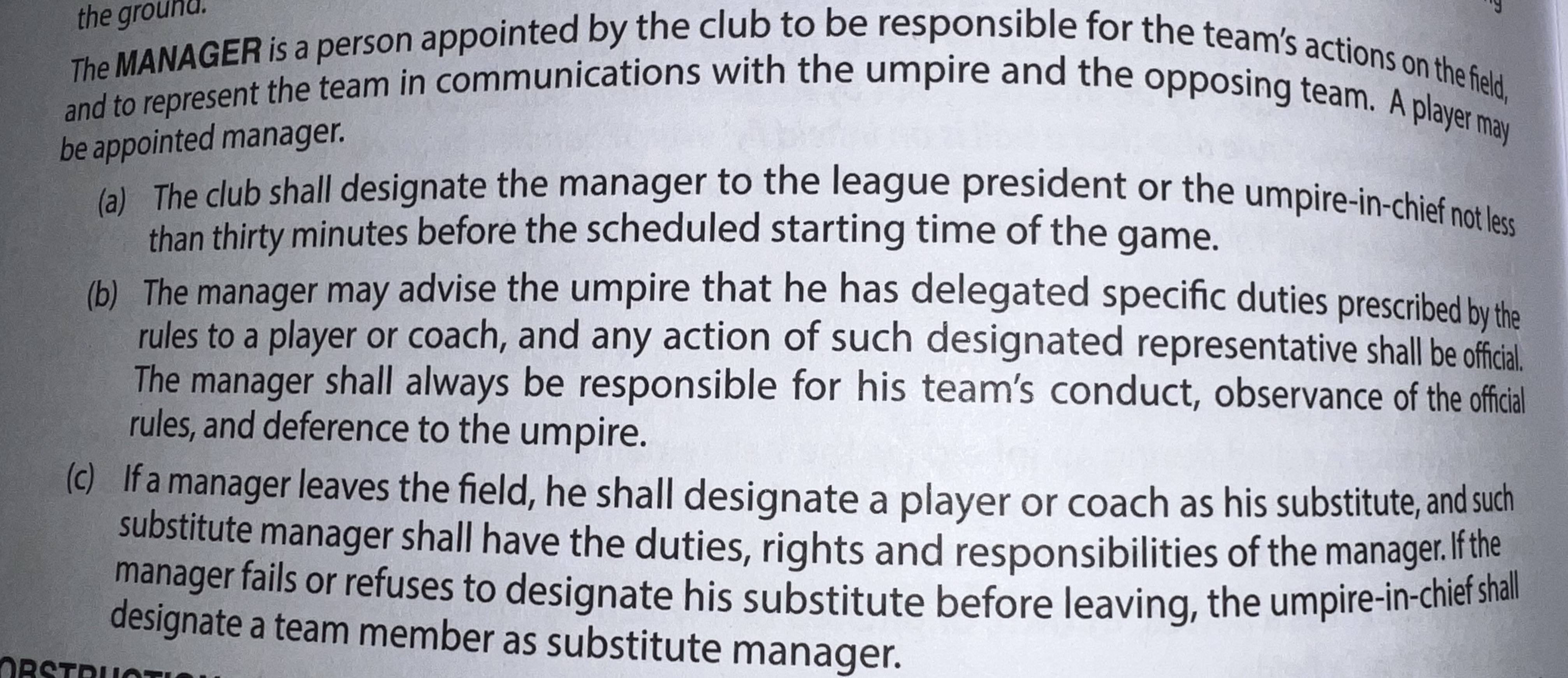
Some background to add context to better answer your question and for future use. Sorry if I am being Captain Obvious in some of this explanation. I am not only an Umpire, I am also the President of a local CR/BR league and have to deal with issues like this one regularly. The way CR/BR is set up using what is known as Sports Engine (online platform) you must designate who the Manger is and all other coaches, bat boys, etc on your roster. This is submitted to CR/BR and eventually used for State, Regional and World series play(Insurance too) and they hold you to it once it is at the State and higher levels. So there is a designated Manager but in the actual 2026 CR/BR rule book (see picture) it defines what the Manager does and can do. No where in the CR/BR rule book does it stipulate that the roster Manager has to be the one at the plate meeting to address the Umpire , they don't address this in game preliminaries and its not mentioned in the Umpire section (9.0). Now comes the twist. CR/BR allows Leagues to have/use Local rules for local play only. Once a team moves to State and higher, they are held strictly to the issued CR/BR rule book. Examples of this that are used in my League address your question, as we have had similar situations. My League has stipulated that the Manger will take the plate meeting and will be the only one allowed to address the Umpire. If the manager is not at the plate meeting ( and this happens a lot due to life), the person/coach taking the plate meeting is the only one who can address the Ump, even if the manager shows up after the plate meeting. Another local rule exception that we allow that CR doesn't, is lead offs in the 10U division. All my league Team managers and Umps know that our league rule set is: Local rules ( same as CR/BR with our local exceptions) , followed by MLB (OBR) and strict CR/BR only for State and higher play. So as you can see, "it depends" on what rules, local or strictly CR, were being used at your tournament. They may have a plate meeting rule similar to what my League uses. In my case, our UIC and the other Umps, self included, all state at the plate meeting that the person /coach taking the meeting is the only one that should approach the Ump during play if they have questions. Since you said this was a tournament and its Fall season and no tourny trail after local play, I am assuming it was Division playoffs/championship? Again, local tourny rules may also be in place, as is done in my League as well. For example, during Division Tourny play we do away with time limits, run rules, etc in certain age divisions that are typically in place during normal season play. So the long way around to answering you question is ask whom ever is running the tourny what rule sets/ground rules they will be playing by and to make your life easier, at the plate meeting tell both people/coaches that they are the only ones you will interact with once play starts. If there is an issue with this, it'll probably make itself known then and you can address it before it gets to what you experienced. Alternatively, as mentioned, you can do a "who are you?" and then follow up with "you weren't at the plate meeting, I will only speak to the person at the plate meeting." Hope this helps you out and answer your question.